Shortcut Dropdown
Design Pattern
Problem summary
The user needs to access a specific section or functionality of a website in a quick way regardless of hierarchy.
Example
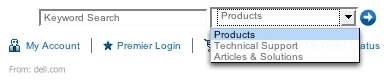
Usage
- Use to shortcut an otherwise hierarchical structure of a website.
- Use when there are specific functionality or pages that are more frequently used than other parts of the website. Use the shortcut box to show these choices in order to shorten the path for the users.
- Use when you want shortcuts to pages that are possibly on different hierarchical levels of the page.
- Can also be used as navigation when short on space, although it is not advised.
Solution
- Add a combobox (a
<select>box in HTML to list a number of fixed locations (URLS) on one or more pages. When the form is submitted, the user is redirected to the chosen page. - An alternate version is to redirect to the chosen page as soon as the user selects an item from the combobox and not when he submits the form.
Rationale
The often hierarchical structure of a website can at times impede the path to specific functionality of a website. By adding a shortcut to the most frequently used functionality, the path can be shortened: the number of clicks can be lessened and the confusion decreased.
This article has been commented 2 times.
User Interface Design Patterns
- Forms
- Explaining the process
- Community driven
- Tabs
- Jumping in hierarchy
- Menus
- Content
- Gestures
- Tables
- Formatting data
- Images
- Search
- Reputation
- Social interactions
- Shopping
- Increasing frequency
- Guidance
- Registration
Persuasive Design Patterns
- Loss Aversion
- Other cognitive biases
- Scarcity
- Gameplay design
- Fundamentals of rewards
- Gameplay rewards
2 comments
Sam on Dec 27, 2008
I think the dropdown box in the example screenshot is actually part of the search form, allowing the user to choose what area to search in.
jamie lopez on Aug 13, 2009
hay i need a drop down shotrt cut
Comments have been closed