Reminder Scheduler
Design Pattern

Alternate titles: Scheduled Reminder, Plan Your Next Session, Reminder Setup.
Problem summary
After a first success users intend to come back, but the intention has no moment attached to it and fades.
Example
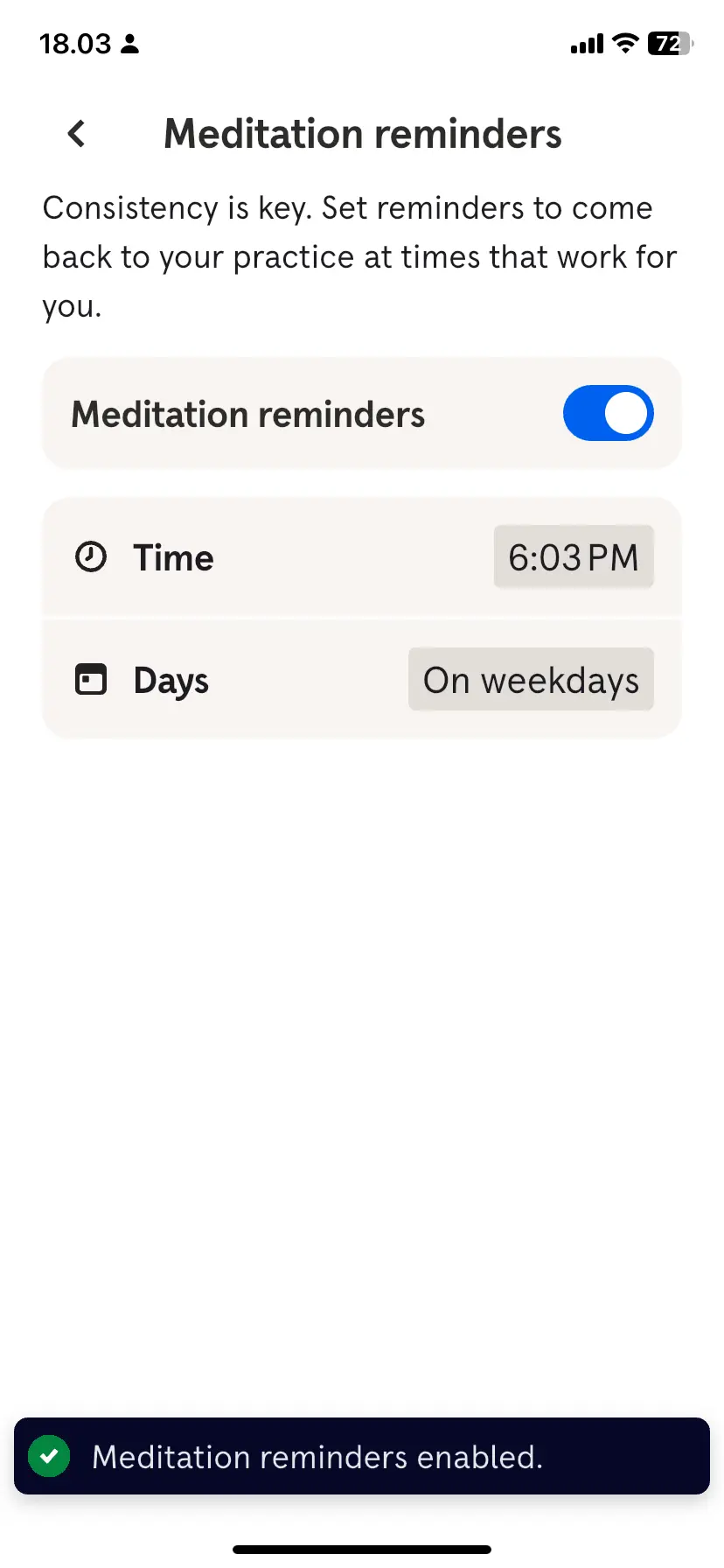
▲ Headspace’s “Meditation reminders” screen explains the reason in one sentence (“Consistency is key. Set reminders to come back to your practice at times that work for you.”), then offers a switch, a Time (6:03 PM) and Days (“On weekdays”). A toast at the bottom confirms: “Meditation reminders enabled.”
Usage
- Use when the product’s value depends on a recurring behavior.
- Use when the behavior fits naturally after an existing routine, such as a meeting, a commute or the start of the day.
- Do not use when usage is spontaneous and irregular by nature.
The card deck
Find more patterns like Reminder Scheduler in the UI Patterns card deck
A collection of 60 User Interface design patterns, presented in a manner easily referenced and used as a brainstorming tool.
Solution
Ask the user when they will do this again, and send the reminder at that moment.
Ask for a time, not for permission to nag
A general “turn on reminders” switch leaves the product to decide when to interrupt. Ask for the moment instead. Headspace’s reminder screen names the reason (“Consistency is key. Set reminders to come back to your practice at times that work for you.”) and then asks for two things: the time and the days. The user decides when the product may speak.
Keep the choices few and concrete
A time and a set of days is enough. Offer common groupings such as “On weekdays” or “Every day” instead of seven checkboxes. Where the product knows the user’s routine, suggest a moment tied to it, such as after the weekly team meeting, rather than a clock time.
Confirm that it is set
Say that the reminder is on. Headspace shows a short confirmation at the bottom of the screen, “Meditation reminders enabled.”, so the user does not wonder whether the choice was saved.
Ask when the user is motivated
The best moment is right after a success, when the intention to return is strongest. Asking later, from a settings screen, still works but relies on the user finding it.
Make it easy to change or stop
Keep one switch that turns the reminders off, and let the user change the time later. A reminder that continues after the user has stopped benefiting becomes noise.
Rationale
An intention to return is easily forgotten. Naming when and where the behavior will happen turns the intention into a plan, which psychologists call an implementation intention: “when X happens, I will do Y”. People who make such a plan follow through considerably more often than people who only intend to.
A scheduled reminder also anchors the behavior to a routine the user already has, which is how habits form. The reminder arrives at a time the user chose, which makes it a cue the user recognizes as their own and not as an interruption by the product.
Discussion
Defaults decide more than the user does
A reminder screen needs a starting time. Headspace’s screen appears to start from the current time (6:03 PM when it was captured), which is when the user happens to be setting it up, not necessarily when they will practice. A default that matches the user’s routine, or a prompt to choose, makes the plan more likely to hold.
Reminders are not the same as priming
Permission Priming asks whether the product may send notifications at all. A Reminder Scheduler asks when. They are often used together: first the permission, then the time.
Measuring it
Track the share of users who set a time, and the return rate at that time compared with users who did not set one.