Device Handoff
Design Pattern

Alternate titles: Continue on Another Device, Cross-device Continuity, Send to Phone, Scan to Continue.
Problem summary
Users start a task on one device but can only finish it on another, and the work and the will to finish it get lost on the way.
Example
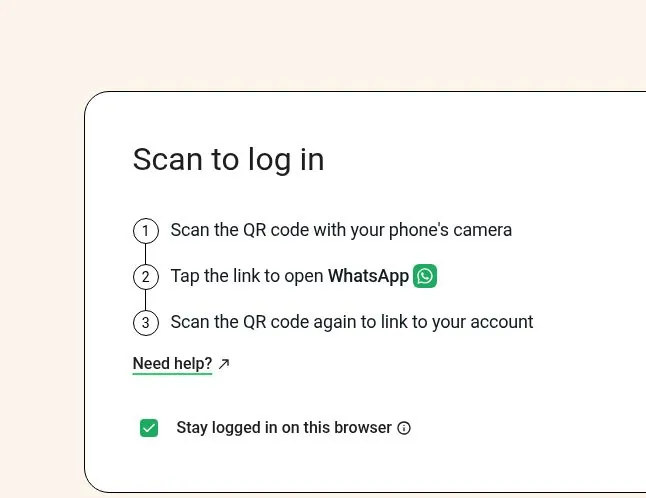
▲ WhatsApp’s web login hands the task to the phone the user already has: three numbered steps to scan the QR code, open WhatsApp and scan again to link the account, with an option to stay logged in on this browser.
Usage
- Use when part of the task fits one device better than another, such as installing a desktop app after signing up on a phone, or scanning a document with a phone camera during setup on a laptop.
- Use when users often discover the product on mobile but do the real work on a computer, or the other way round.
- Use when the user is signed in, or can be signed in safely, on both devices.
- Do not use when the task can be finished well on the device the user is on. Make that device work instead.
- Do not use when moving the session would expose sensitive data on a shared or public device.
The card deck
Find more patterns like Device Handoff in the UI Patterns card deck
A collection of 60 User Interface design patterns, presented in a manner easily referenced and used as a brainstorming tool.
Solution
Let the user move the task to another device in one step, and continue on the new device exactly where they stopped.
Offer it when the device is the problem
Suggest the handoff at the point where the current device falls short: “This step is easier on a computer” or “Use your phone’s camera for this”. Say why the other device is better, and still let the user continue on the current device if they can.
Make the move one step
Show a QR code to scan, send a link to the user’s own email or phone, or show the task on the other device when the user is already signed in there. The user should not have to sign in, search, and navigate again.
Carry the state, not only the account
Open the same task on the new device at the same point: the same step, the same draft, the same filters. Keep what the user entered on the first device.
Confirm on both sides
On the first device, say that the task is now open on the other one, and update it when the task is done there. The user should not wonder which device has the current version.
Offer a later handoff too
If the user can’t switch now, let them send it for later (“Email me a link to finish on my computer”). On the other device, show the waiting task first, as a Resume Prompt.
Rationale
Many people use several devices, and much of their work falls between them. In interviews about using multiple devices, getting at information that was on another device was a recurring problem (Dearman & Pierce, 2008). In onboarding the gap is costly: a user who signs up on a phone and is told to “continue on desktop” has to remember to do it, find the product again, and sign in, and the intention often fades before then. A handoff removes those steps, and keeps the task attached to the moment the user is motivated to finish it.
Discussion
Why it sits under Coming back
A handoff happens most often during setup, so it could also belong under Setting up. It is grouped with the patterns for coming back because its job is the same as theirs: to keep the thread of a task across a break, here a change of device instead of a pause in time. It works the same way for a setup step, a draft, or a lesson.
Device handoff or magic login link
A Magic Login Link signs the user in, and it can be opened on any device that has their email. It moves identity, and it lands on the product’s start page unless it is designed to do more. A device handoff moves the task: it opens the exact step or item on the new device. The two often work together, when a handoff link also signs the user in, but then it needs the same safeguards as a login link: single use, a short expiry, and a confirm step.
Security
A QR code or link that carries a session can be photographed or forwarded. Make it short-lived and single use, show which account and device it is for, and ask for confirmation on the new device before it opens anything sensitive.
Measuring it
Track the share of handoffs that are completed on the second device, the time between the two, and the completion rate of the task for users who switched devices compared with users who stayed. Watch for users who start a handoff and never finish on either device.
- Dearman, D., & Pierce, J. S. (2008). It’s on my other computer! Computing with multiple devices. Proceedings of the SIGCHI Conference on Human Factors in Computing Systems, 767–776. https://doi.org/10.1145/1357054.1357177
More examples of the Device Handoff pattern