Resume Prompt
Design Pattern
Alternate titles: Pick Up Where You Left Off, Continue Where You Left Off, Welcome Back, Continue Card.
Problem summary
Users who return after an interruption have to remember what they were doing and find their way back to it, and many give up before they get there.
Example
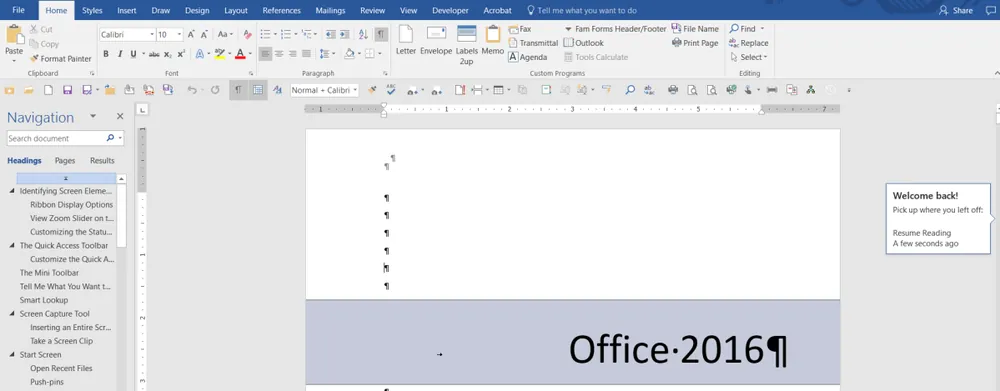
▲ Word reopens a long document with a “Welcome back!” callout at the edge of the page: “Pick up where you left off”, with a link back to where the user stopped reading and how long ago that was.
Usage
- Use when tasks often take more than one session, such as setup, a course, a long form, a draft, or a video.
- Use when users are interrupted often, for example on mobile or between meetings.
- Use when the product keeps the unfinished state, so there is something to resume.
- Do not use when the user finished what they started, or abandoned it on purpose and said so.
- Do not use when the unfinished item is sensitive and other people may see the screen.
The card deck
Find more patterns like Resume Prompt in the UI Patterns card deck
A collection of 60 User Interface design patterns, presented in a manner easily referenced and used as a brainstorming tool.
Solution
When a user comes back to unfinished work, show it first, with one clear action to continue: “Pick up where you left off”.
Show the exact place
Name the item and where the user stopped: the draft’s title and the last section they edited, the lesson and the minute in the video, step 3 of 5 in setup. Restore the cursor, scroll position, filters, and selection when the user continues.
Remind them where they were
Add one line of context to help the user get back into the task: what they did last time, what is left, or the time since they were last here. A small preview of the item works well.
Put it where they land
Show the prompt on the first screen the user sees after returning, as a card or a banner at the top, or as the first row of a list of recent items. One prompt for the most likely item is better than a long list of everything open.
Let them choose something else
Make the prompt easy to dismiss, and offer “Start something new” next to “Continue”. Stop showing an item once the user has dismissed it, and let them discard a draft they no longer want.
Rationale
An interrupted task leaves a pending goal, and memory for that goal fades quickly unless something cues it. In a model of how people suspend and resume goals, cues in the environment help retrieve the goal that was pending (Altmann & Trafton, 2002). A resume prompt is that cue: it puts the unfinished task back in front of the user at the moment they return. People also tend to go back to tasks that were interrupted when they get the chance, a finding known as the Ovsiankina effect (Ovsiankina, 1928), which is closely related to the Zeigarnik Effect. The prompt gives that tendency an easy path: one click instead of a search.
Discussion
Resume prompt or autosave
Autosave makes sure the unfinished work is kept. A resume prompt makes sure the user finds it again. Without autosave there is nothing to resume, and without a resume prompt the saved work may sit unnoticed in a list. Use them together.
Resume prompt or notifications
Notifications reach the user outside the product and bring them back. A resume prompt appears inside the product after the user has come back, on whatever path they took. A notification about unfinished work can link straight to the resume point, but it is an interruption and needs a good reason. The resume prompt only asks for attention when the user has already chosen to return.
Resume prompt or reminder scheduler
A Reminder Scheduler asks the user when they will come back, and reminds them then. A resume prompt does nothing until the user returns, and then takes them to the right place. A reminder brings the user back, and the resume prompt makes the most of the visit.
Unfinished work as pressure
A prompt about unfinished work helps when the user wants to finish it. Repeated messages that make unfinished work feel like a debt (“You’re 80% done, don’t lose your progress!”) turn the pattern into pressure. Show it once per return, and let the user put it away.
Measuring it
Track the share of returning users with unfinished work who continue it from the prompt, the time from return to continuing, and the completion rate of multi-session tasks. Watch the dismissal rate: if most users dismiss the prompt, it is showing the wrong item.
- Altmann, E. M., & Trafton, J. G. (2002). Memory for goals: An activation-based model. Cognitive Science, 26(1), 39–83. https://doi.org/10.1207/s15516709cog2601_2
- Ovsiankina, M. (1928). Untersuchungen zur Handlungs- und Affektpsychologie. VI. Die Wiederaufnahme unterbrochener Handlungen. Psychologische Forschung, 11(1), 302–379. https://doi.org/10.1007/BF00410261