Refinement Controls
Design Pattern

Alternate titles: Regenerate, Variations, Response Refinement, Steering Controls.
Problem summary
Users stop at the first AI output because they don’t know they can improve it, or how.
Example
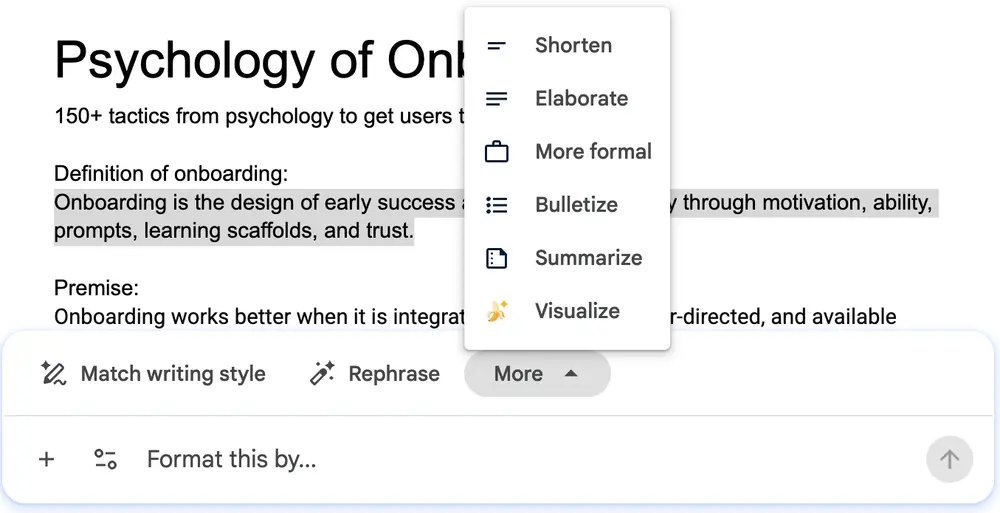
▲ Gemini in Google Docs shows quick adjustments for the selected text, “Shorten”, “Elaborate”, “More formal”, “Bulletize” and “Summarize”, next to “Rephrase”, “Match writing style” and a free-form “Format this by…” field.
Usage
- Use when AI output is a starting point that usually benefits from adjustment.
- Use when users are new to AI features and don’t yet know what they can ask for.
- Do not use when the output is deterministic and has a single correct answer.
The card deck
Find more patterns like Refinement Controls in the UI Patterns card deck
A collection of 60 User Interface design patterns, presented in a manner easily referenced and used as a brainstorming tool.
Solution
Place a small set of refinement actions next to every result, so the next step is one click away.
Offer the common adjustments as buttons
Offer regenerate, show variations, and the adjustments people ask for most, such as “Shorter”, “Elaborate”, or “More formal”. Buttons are easier than writing a new prompt, especially for users who don’t yet know what the system can do.
Keep a free-form option
Next to the buttons, keep a text field for requests the buttons don’t cover (“Format this by…”). The buttons teach what is possible, and the field handles the rest.
Let users edit directly and keep earlier versions
Users should be able to edit the output by hand, and to go back to a version they preferred.
Point them out after the first result
During onboarding, draw attention to the controls once the first result is on screen, so steering is learned as part of the first success.
Rationale
Refinement controls teach users that working with AI is iterative. A disappointing first result becomes a next step instead of a reason to leave, and users build the skill of reproducing success. Buttons for common adjustments also lower the effort of the second request, which is where many users give up. They are the refinement counterpart of Suggested Prompts: suggestions help with the first request, controls with the next.
Discussion
Too many controls
So many controls that users can’t tell which matters. Start with three to five adjustments, and let usage data decide which stay.
Refining or starting over
Make it clear whether a refinement changes the current result or creates a new one, and keep the original available, or offer Undo. Users who fear losing a good draft will not experiment.
Measuring it
Track refinement actions per result, and whether users who refine return more often than users who don’t.
- Amershi, S. et al. (2019). Guidelines for Human-AI Interaction. Proceedings of CHI 2019.