Sample Data
Design Pattern
Alternate titles: Demo Data, Demo Workspace, Sample Project, Example Content.
Problem summary
The product only shows what it is good for once it holds real data, but new users have no data in it yet and setting it up takes time they haven’t decided to spend.
Example
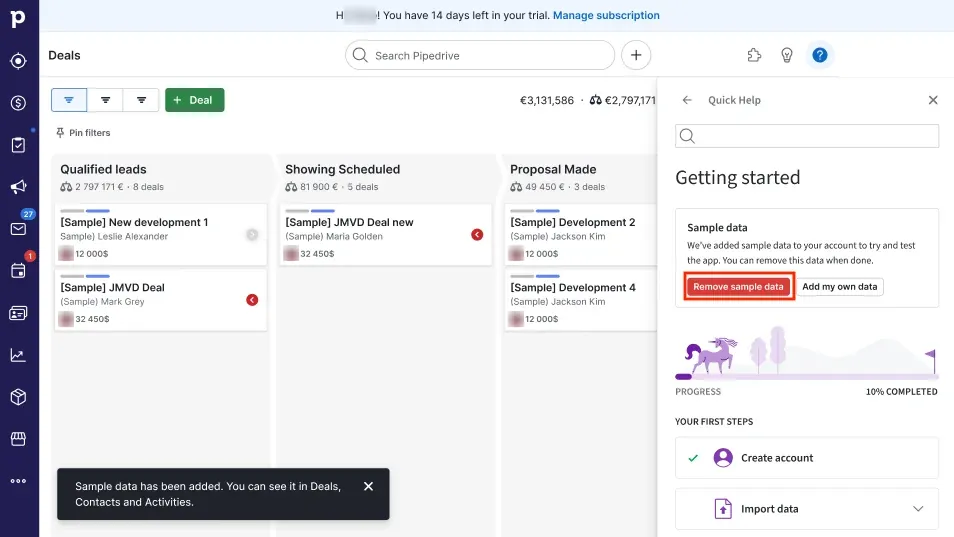
▲ Pipedrive fills a new trial account with sample deals, each marked “[Sample]”, and confirms that sample data has been added to Deals, Contacts and Activities. The Quick Help panel says why the data is there and offers “Remove sample data” or “Add my own data”.
Usage
- Use when the product’s value only becomes visible with a realistic amount of data, such as reports, dashboards, pipelines, or a populated inbox.
- Use when importing or entering real data takes setup the user isn’t ready to do in the first session.
- Use when users want to explore and try things without fear of breaking their own work.
- Do not use when the product is useful with the first item the user creates, so their own first item can do the job.
- Do not use when the sample data would be mistaken for the user’s own data, or could end up in their real reports, invoices, or messages.
The card deck
Find more patterns like Sample Data in the UI Patterns card deck
A collection of 60 User Interface design patterns, presented in a manner easily referenced and used as a brainstorming tool.
Solution
Fill a new account, or a separate demo space, with realistic example data, so users can see and try the product working before they bring their own data.
Label it clearly, everywhere
Mark sample items as samples wherever they appear: a banner on the demo space, a tag on each record, a different name (“Sample contact”). A user should never wonder whether a customer, payment, or message is real.
Make it realistic and relevant
Use data that looks like the user’s situation, chosen from what they said at signup where possible. A marketing team should see campaigns, and a support team should see tickets. Show enough of it that the reports and views look the way they will in real use.
Make it easy to clear
Offer one obvious action that removes all sample data at once, and say exactly what it removes. Keep the user’s own items when they clear the samples, and confirm when it is done.
Point to the next step with real data
Next to the sample data, offer the way to bring in real data: import, connect a source, or create a first item. The sample shows what the product can do, and the next step should make it the user’s own.
Keep it out of real outputs
Sample records should not send emails, appear in billing, or count toward usage limits.
Rationale
A filled product teaches its structure at a glance. Users see what a full view looks like, which fields matter, and what the reports say, without first doing the work of creating it. Learning research on worked examples found that studying solved examples taught a new kind of problem with less time and fewer errors than solving problems from the start (Sweller & Cooper, 1985). Sample data works the same way for a product: it is a worked example of the product in use. It also lowers the cost of trying things, because nothing the user changes is theirs to lose.
Discussion
Sample data or blank slate
A Blank Slate is the empty screen itself, and how it explains what will appear there and how to start. Sample data fills the screen so the user can see and use the result before they start. The two often work together: a blank slate can offer “Explore with sample data” next to “Create your first project”. Choose a blank slate when the user’s first item is quick to make, and sample data when value only shows with many items.
Sample data or template gallery
A Template Gallery gives the user a starting structure to make their own: they keep the template and fill it with their content. Sample data is for looking and trying, and it is meant to be removed. Templates can contain example content too, but then they need the same clear labels, so the user knows which parts to replace.
Sample data that stays forever
Sample records left in a real account confuse search, reports, and teammates who join later. Remind users that the samples are still there once they have added real data, and offer to clear them.
Measuring it
Track the share of users who explore the sample data, the share who go on to add real data, and the time until they do. Also track how often users clear the samples, and support requests that mention data they didn’t create, which point to labels that aren’t clear enough.
- Sweller, J., & Cooper, G. A. (1985). The use of worked examples as a substitute for problem solving in learning algebra. Cognition and Instruction, 2(1), 59–89. https://doi.org/10.1207/s1532690xci0201_3