Capability Notice
Design Pattern

Alternate titles: Capabilities and Limitations, AI Caveat, What I Can Do, Expectation Setting.
Problem summary
New users don’t know what an AI assistant is good at or where it fails, so they either ask it for things it can’t do and give up, or rely on it where they shouldn’t.
Example
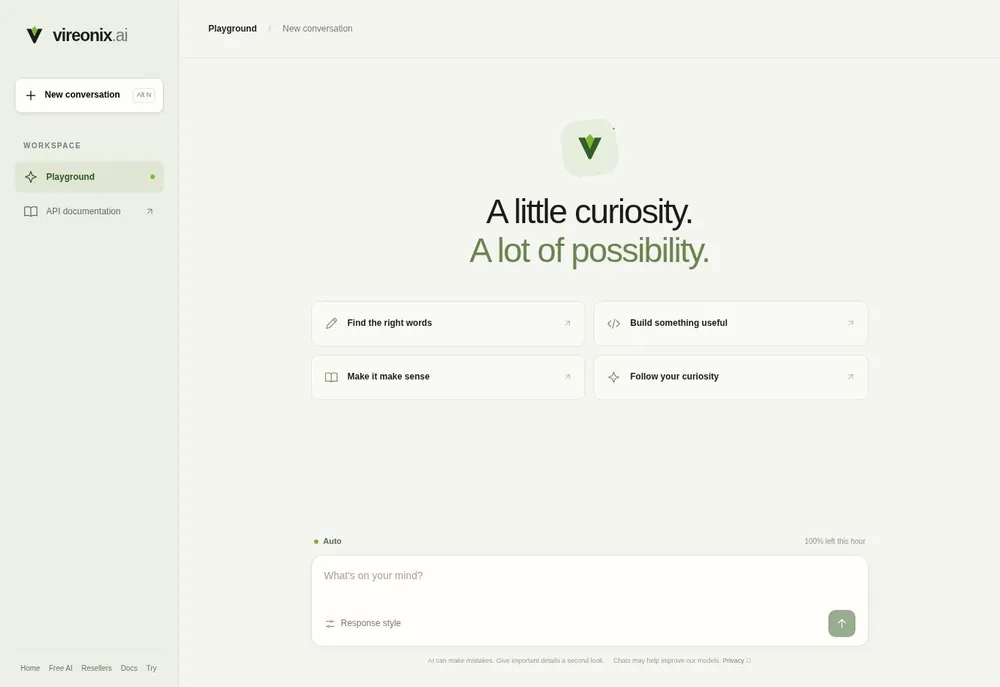
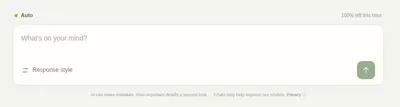
▲ Vireonix’s playground offers four starting tasks above the input, and under it a standing notice: “AI can make mistakes. Give important details a second look.” A line above the input shows how much of the hourly allowance is left.
Usage
- Use when the assistant is good at some tasks and unreliable at others, and users can’t tell which is which from the interface.
- Use when users arrive with expectations set elsewhere, by other AI products or by marketing.
- Use when a wrong answer would cost the user something, so they need to know when to check.
- Do not use as a legal disclaimer that nobody reads. If the notice doesn’t change what users do, rewrite it.
The card deck
Find more patterns like Capability Notice in the UI Patterns card deck
A collection of 60 User Interface design patterns, presented in a manner easily referenced and used as a brainstorming tool.
Solution
Before or at the first use, say briefly what the assistant does well, what it can’t do, and how often it may be wrong. Then repeat the relevant part at the moment it matters.
Name the strengths as tasks
List two or three things the assistant is good at, as tasks the user recognizes (“Summarize a long thread”, “Draft a reply in your tone”). Make each one a starting point the user can click, so the notice doubles as a first prompt.
Name the limits in plain words
State what it can’t do or doesn’t know, specifically: “It can’t see files you haven’t shared”, “It doesn’t know about events after its training”, “It can get numbers wrong”. A specific limit is more useful than “AI can make mistakes”.
Say how well it works
Where you know it, say how reliable the assistant is for a kind of task, and what to do about it: “Check dates and amounts before you send.”
Repeat the limit where it applies
Keep a short, permanent line near the input, and show the specific limit again when the user asks for something close to it, for example a calculation, a legal question, or a recent event.
Keep it current
Update the notice when capabilities change, and say what is new.
Rationale
Trust in automation works best when it matches what the system can actually do. People who trust a system more than it deserves rely on it where they shouldn’t, and people who trust it less than it deserves don’t use it where it would help (Lee & See, 2004). Setting expectations before first use helps both: in a study of an AI scheduling assistant, techniques that prepared users for its imperfections led to significantly higher acceptance of the same system (Kocielnik, Amershi & Bennett, 2019). The first two guidelines for human-AI interaction say the same: make clear what the system can do, and how well it can do it (Amershi et al., 2019).
Discussion
Capability notice or source citations
A capability notice describes the assistant in general, before the user relies on it: what it is good at, and where it fails. Source Citations work on one answer at a time, after it is written: where each claim came from, and how certain it is. The notice tells users when to be careful, and the citations give them the means to check. Use both when answers contain facts.
Why not “disclosure”
In AI design, “disclosure” usually means labelling content or a conversation as AI-generated. That is a different job. A capability notice assumes the user knows they are working with an AI, and tells them what it can and can’t do.
A notice that only protects the company
A generic line such as “AI can make mistakes” in small print meets a requirement but changes little. Users learn to ignore it. Specific limits placed where they apply are the ones that change behavior.
Overselling at first use
A welcome message that promises the assistant can “do anything” sets up the first failure, and makes it more disappointing. Inflated expectations lower acceptance of an AI system, which is the problem expectation setting is meant to solve (Kocielnik, Amershi & Bennett, 2019).
Measuring it
Track the share of first requests that the assistant can’t handle, how often users verify or correct answers in areas you flagged, and retention after a user’s first failed request. Fewer impossible requests and steady retention after errors suggest the notice is working.
- Amershi, S., Weld, D., Vorvoreanu, M., Fourney, A., Nushi, B., Collisson, P., Suh, J., Iqbal, S., Bennett, P. N., Inkpen, K., Teevan, J., Kikin-Gil, R., & Horvitz, E. (2019). Guidelines for human-AI interaction. Proceedings of the 2019 CHI Conference on Human Factors in Computing Systems, 1–13. https://doi.org/10.1145/3290605.3300233
- Kocielnik, R., Amershi, S., & Bennett, P. N. (2019). Will you accept an imperfect AI? Exploring designs for adjusting end-user expectations of AI systems. Proceedings of the 2019 CHI Conference on Human Factors in Computing Systems, 1–14. https://doi.org/10.1145/3290605.3300641
- Lee, J. D., & See, K. A. (2004). Trust in automation: Designing for appropriate reliance. Human Factors, 46(1), 50–80. https://doi.org/10.1518/hfes.46.1.50_30392
More examples of the Capability Notice pattern