Deferred Verification
Design Pattern

Alternate titles: Delayed Email Verification, Verify Later.
Problem summary
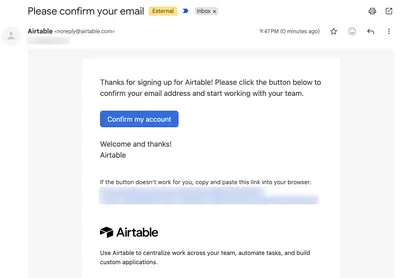
Requiring email confirmation before anything else sends users to their inbox at the moment they are most ready to act, and many never come back.
Example
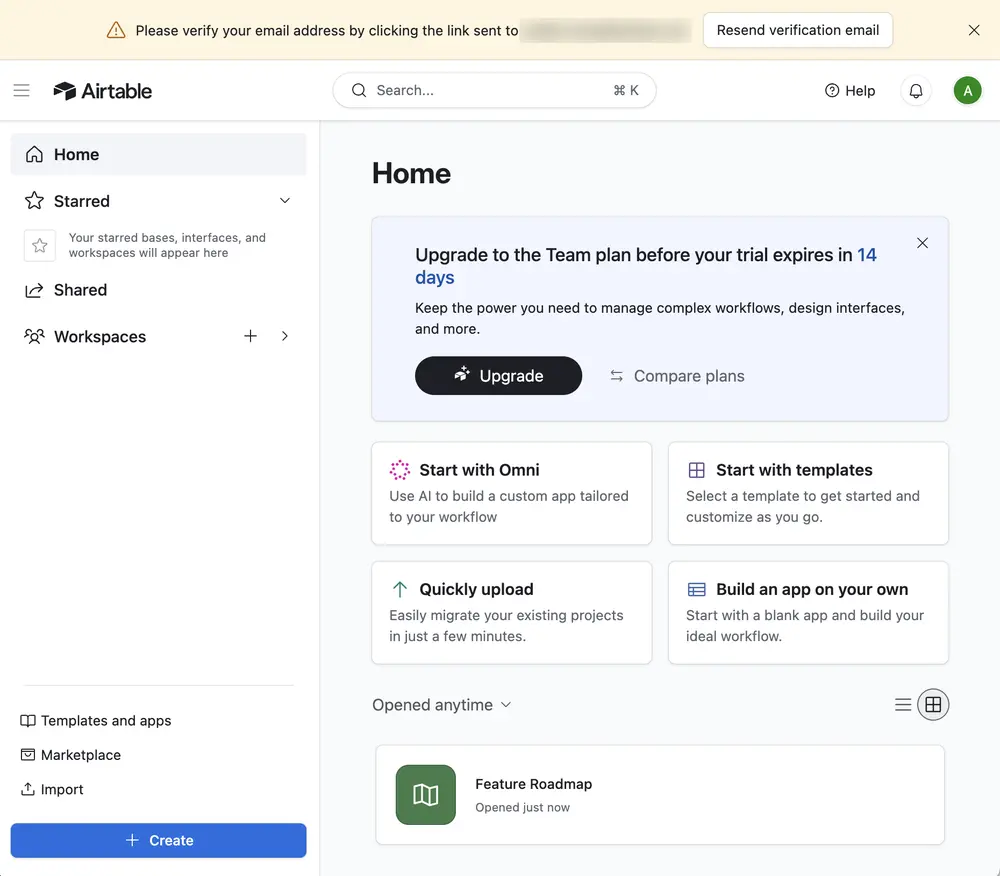
▲ Airtable lets new users straight into the product. A banner across the top says “Please verify your email address by clicking the link sent to …” with a “Resend verification email” button and a close icon.
Usage
- Use when the first session can be useful without a confirmed address.
- Use when users sign up in a short window of opportunity, such as on mobile or between meetings.
- Do not use when unconfirmed accounts could be used for abuse, such as sending invitations or messages to others.
- Do not use when the product must contact the user before they can benefit.
The card deck
Find more patterns like Deferred Verification in the UI Patterns card deck
A collection of 60 User Interface design patterns, presented in a manner easily referenced and used as a brainstorming tool.
Solution
Let the user into the product immediately, and ask for confirmation later, at the moment it matters.
Send the email, then get out of the way
Send the confirmation email as soon as the user signs up, and let them carry on. The user should land in the product, not on a “Check your inbox” page that waits for them to come back.
Remind with a calm banner
Show a dismissible banner at the top of the product that says what to do and where the email went, with a “Resend” link. Airtable’s says “Please verify your email address by clicking the link sent to …” next to a “Resend verification email” button, and can be closed. Keep it quiet: it should not cover the product or reappear on every screen.
Explain what verification unlocks
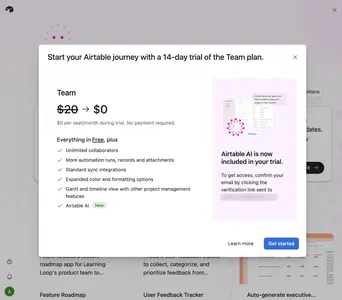
A request that only says “you must verify” is an order. A request that says what the user gets is a reason: “To get access to Airtable AI, confirm your email by clicking the verification link.” State the benefit, and put the request next to the thing it unlocks.
Ask at the moment it matters
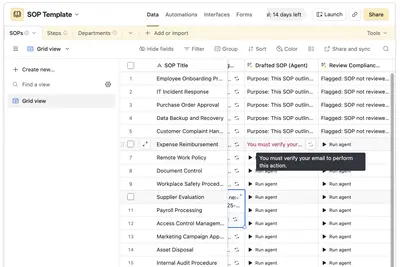
Require confirmation before the user can do something that affects others or costs money: sending invitations, publishing, paying, or exporting data. Airtable lets the user build in a base straight away, and shows “You must verify your email to perform this action” when they try to run one of its automated agents.
Keep the user’s work
Confirming later should take the user back to where they were, with everything they did in the meantime. If they never confirm, tell them how long their account stays active.
Rationale
Email confirmation is a step the system needs, not one the user wants. Putting it first moves it into the user’s path to their first result, and sends them to an inbox full of other messages at the moment their attention is highest. Deferring it keeps the user in the product during their window of opportunity, and asks for the confirmation once they have a reason to give it.
People are also more willing to do a small chore after they have started something. Having built something in the product, the user has an investment to protect, which makes the request for a click on a link easier to accept (Commitment and Consistency).
Discussion
Deferred Verification or Lazy Registration
The two patterns defer different things. Lazy Registration defers creating the account: the user can try the product before they have given any details. Deferred Verification defers confirming the email address: the account exists, with an address attached, and the user can use it before proving the address is theirs. A product can use one without the other, or both.
The cost of deferring
An unconfirmed address can be mistyped or belong to someone else. Messages sent to it never arrive, or arrive with a stranger. Decide what an unverified account may do, and what it may not. Airtable lets users try its main features, and blocks the actions that affect others.
Banners that turn into nagging
A permanent, alarming banner turns a deferral into pressure. Make it dismissible, and bring it back only when the user is about to do something that requires a confirmed address. After a few days, an email reminder is a better place for it than the product.
Verifying with a magic link
If the product already uses a Magic Login Link, the first login link also confirms the address, and no separate step is needed. That is the simplest form of verification: it has no extra step to defer.
Measuring it
Compare activation before and after the change, and track the share of users who eventually verify. If activation goes up and few users verify, the banner is probably not doing its job.