Usability testing is a research method in which you watch real people try to complete realistic tasks with a product, so you can see where the design confuses, slows down or stops them. You learn from what participants do, not from what they say they would do.
Ask people whether a design is easy to use and most will say yes. Give them a task and watch, and a different picture appears: they look for a button in the wrong place, misread a label, or give up and do something else. That gap between opinion and behavior is why usability testing exists.
This guide covers the whole method: how a test works, which type to choose, how to write tasks, how to turn observations into design changes, how many people to test with, and the mistakes that make results misleading.
At a glance
- Give people a realistic goal, then watch. Don’t help.
- About five people per round finds many problems. Fix them, then test again.
- Measuring needs more people: around 20 per design.
- A usable design can still be one nobody wants.
How usability testing works
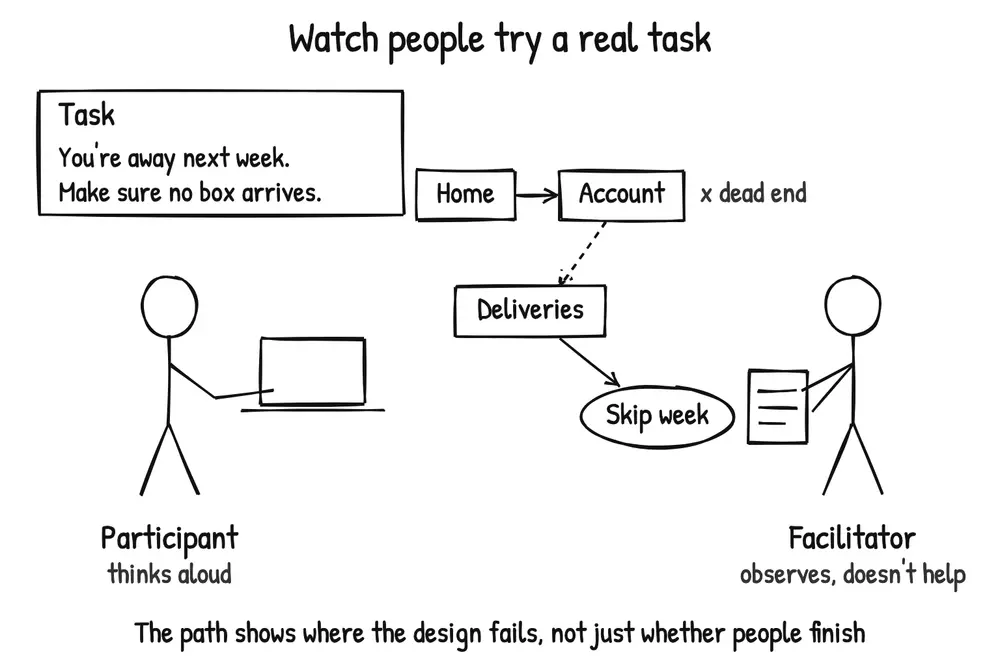
A participant tries a realistic task while the facilitator observes without helping. The path shows where the design fails, not just whether people finish.
A usability test has three parts:
- Participants who match the people the product is for. Five people who would never use your product can produce confident, misleading findings.
- Tasks that describe a realistic goal, such as “You’re away next week. Make sure no box arrives,” rather than instructions like “Click Deliveries.”
- A facilitator who gives the tasks, observes and asks neutral follow-up questions, without helping. In an unmoderated test, software delivers the tasks and records the session instead.
Participants are often asked to think aloud while they work, so you hear what they expect, what they’re looking for and why they choose one path over another.
What you look for follows the ISO 9241-11 definition of usability: whether specified users can reach specified goals effectively (do they succeed?), efficiently (how much time and effort does it take?) and with satisfaction (how does it feel?), in a specified context of use. A usability test makes all three observable for one product, one group of users and one set of tasks.
You can test almost anything people interact with: a live product, a competitor’s product, a clickable prototype, or a paper prototype before any code exists. The earlier you test, the cheaper the problems are to fix.
Watching someone do a task will show you where the problems and inefficiencies really are, not where the customer thinks they are.
Types of usability testing
Most usability tests combine three choices:
| Choice | Option | Best when |
|---|---|---|
| Who runs the session | Moderated: a facilitator is present, in person or on a video call | You need to understand why people struggle, ask follow-up questions, or test a rough prototype |
| Unmoderated: participants complete tasks alone, guided by a testing tool | Tasks are simple and self-explanatory, and you need many sessions quickly | |
| Where it happens | In person | You need to see body language, physical devices or a real environment |
| Remote | Participants are spread out, or their own device and setting matter | |
| What you collect | Qualitative (often called formative) | You want to find and understand problems so you can improve the design |
| Quantitative (often called summative) | You want metrics such as task success or time on task, to benchmark or compare designs |
Some formats are worth knowing by name. Each links to a step-by-step play on Learning Loop:
- Guerilla user testing: short, informal sessions with people you find in a café or a corridor. Fast and cheap, but you have less control over who takes part.
- Remote user testing: many unmoderated sessions in parallel, through an online testing tool.
- User testing competing products: run the same tasks on competitors’ products to learn what works before you design. The Real Startup Book calls this a generative method: it produces ideas for your own design. Don’t confuse it with competitive usability testing, which benchmarks your product against competitors to see which performs better.
- First click testing: check where people click first to start a task, usually to test navigation and labels.
- Five second testing: show a design for five seconds and ask what people remember, to test first impressions and clarity.
The last two are focused tests of one part of the experience. They are useful, but they don’t replace watching people complete a whole task.
Usability testing vs other methods
Usability testing answers one question well: can people use this? A product can be easy to use and still fail, so keep it apart from the methods that answer other questions:
| Method | The question it answers | How it differs from usability testing |
|---|---|---|
| Customer interviews | What problems do people have, and how do they solve them today? | Explores needs and context; usability testing evaluates a specific design |
| A/B testing | Which version performs better with real traffic? | Measures what happens at scale, but not why; usability testing shows why with a few people |
| Acceptance testing | Does the system meet the agreed requirements? | Checks the software against a specification, not whether people can use it |
| Beta testing | How does the product hold up with real users before release? | Real use over time, usually without close observation of individual tasks |
| Focus groups | What do people say they like, need and think of competitors? | A group discusses opinions; a usability test watches one person at a time use the product |
| Heuristic evaluation | Does the design break known usability principles? | Experts review the design; no users take part |
| Synthetic users | What might simulated users say? | AI-generated responses can help prepare a study, but they don’t show real behavior |
| Fake door testing | Do people want this enough to act? | Tests demand; usability testing assumes people already want to do the task |
A usability test gives people a goal and asks whether they can reach it. It can’t tell you whether they would have that goal on their own, pay for it or come back. As The Real Startup Book puts it, if every participant completes the tasks, the product is usable, but that says nothing about whether it is desirable or delivers its value proposition. Use demand and value tests for those questions.
Don’t read interest into praise at the end of a session either. Rob Fitzpatrick’s The Mom Test calls compliments “the fool’s gold of customer learning”. If you want a signal of demand, ask for a commitment instead, such as a pre-order or a trial with their team, and treat the answer as a separate result from the usability findings.
A product can be easy to use and still fail.
How to run a usability test
- Write down what you need to learn. For example: “Can subscribers skip a delivery without help?” A clear question decides which tasks, participants and design to test.
- Recruit the right participants. Screen for the behavior that matters, such as “has a meal-kit subscription”, not just demographics. Recruit a few extra, because some people won’t show up. Match the participants to the question: existing users won’t show you the problems new users have. Don’t let a perfect profile delay testing, though. Steve Krug’s advice in Don’t Make Me Think is to “recruit loosely and grade on a curve”: when someone struggles, ask whether your real users would have the same problem.
- Write realistic tasks. Give each task a goal, a reason and a clear end point, in the user’s words rather than the interface’s. See the examples below.
- Prepare a short script. Welcome the participant, explain that you’re testing the product and not them, and that anything they find difficult is exactly the feedback you need. Ask for permission to record, and plan neutral follow-up questions such as “What did you expect to happen?” Use the same script in every session, so differences come from the participants, not from how each session was introduced.
- Run a pilot session with a colleague or one participant, and fix confusing tasks, broken prototype links and timing before the real sessions.
- Run the sessions. Start with a few warm-up questions about a specific past experience (“Tell me about the last time you went away”), not what people “usually” do. Read each task aloud, then stay quiet. Facilitators tend to rush to fill silences, but a pause is often when people work out what to do next, or say what they expected. Don’t finish their sentences or suggest answers. When people ask for help, turn the question back: “What would you do if I weren’t here?” Note what they do, where they hesitate, what they say and what they show through frustration or relief. Save questions about why they did something for after the task, and end with a few open questions about the whole experience.
- Analyze across sessions. Write a short summary straight after each session, while it’s fresh, and ask every observer to note the three most serious problems they saw before they discuss anything. Then, as a team, list each problem, how many participants hit it and how badly it affected them, and group the problems by theme. Separate what you saw from what you think it means. Pay attention where people said one thing and did another: “that was easy” after three wrong turns is a finding, not a contradiction to ignore.
- Fix, then test again. Prioritize the most severe problems, change the design and test it with new participants. Your fix is a new design, and it can introduce new problems.
Usability test task examples
Task wording decides what you learn. A task that names the button tests whether people can read; a task that describes a goal tests whether the design works:
| Weak task | Problem | Better task |
|---|---|---|
| “Click Deliveries and skip next week.” | Names the path and the label, so it tests nothing | “You’re away next week. Make sure no box arrives while you’re gone.” |
| “Do you like the new checkout?” | Asks for an opinion, not behavior | “Order the cheapest box that feeds two people, using the card details on this sheet.” |
| “Find information about our plans.” | No end point: you can’t tell when it’s done or whether it succeeded | “You want vegetarian meals from next month. Find out whether that changes what you pay.” |
| “Imagine you’re a busy parent of three…” | An invented role people have to act out | Recruit people who have the need, and ask them to use their own situation |
Ask participants to read each task aloud, and order tasks the way people would naturally do them. When you compare two designs, alternate which one each participant sees first, because people learn as they go and the second design would otherwise look easier.
Where you can, let participants fill in the details. Krug’s example: “Find a book you want to buy, or a book you bought recently” beats “Find a cookbook for under $14”, because people care about the result and use what they know.
A good task has
- A goal the participant recognizes
- A reason to do it
- A clear end point
- None of the interface’s labels
A worked example: skipping a delivery
This example is hypothetical. The product, participants and numbers are invented to show the reasoning.
A meal-kit company sees many subscribers cancel before a holiday and wonders whether they simply can’t find how to skip a week. The team runs a moderated remote test of the live app with five subscribers and one task: “You’re away next week. Make sure no box arrives while you’re gone.”
What they observe:
- Four of the five open Account first. One says, “I’d look under my plan.”
- Two find Skip week on the Deliveries screen without help, after looking in Account.
- Two give up. One of them opens the cancellation page and says, “I guess I’ll cancel and sign up again.”
- The fifth goes straight to Deliveries and succeeds.
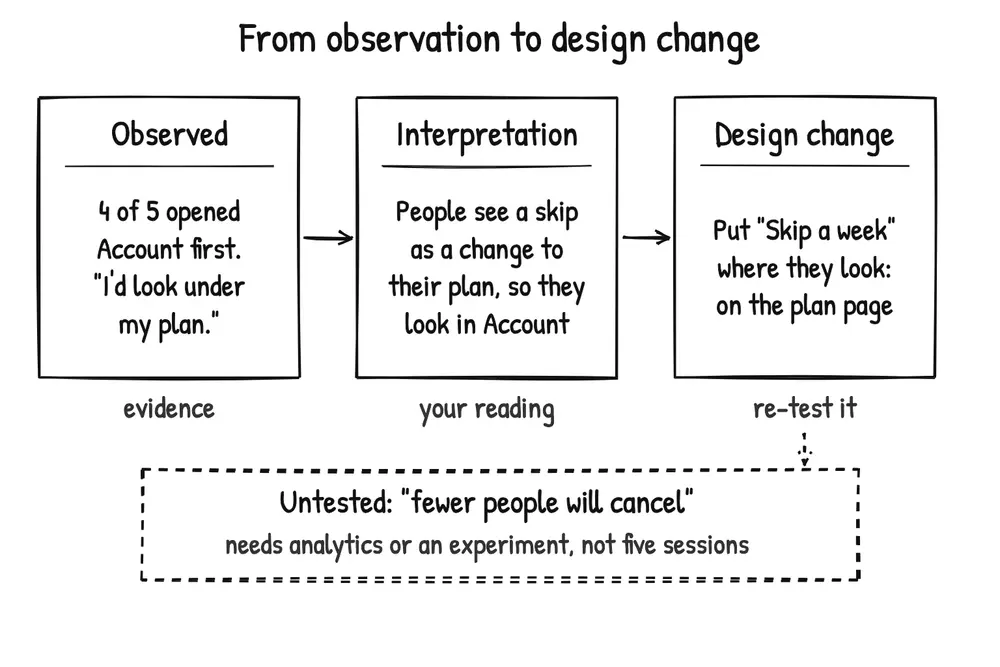
Observation is evidence, interpretation is your reading, and the design change is what you test next. Keep untested business claims apart.
How they interpret it. Subscribers think of skipping as changing their plan, so they look in Account, but the feature lives under Deliveries. Using Nielsen’s severity scale from 0 (not a usability problem) to 4 (usability catastrophe), they rate it a 4: it affected most participants and led one to try cancelling.
What they change. They add Skip a week to the plan page in Account and keep it under Deliveries too. They don’t add a tutorial or coachmarks, because the problem is where the feature is, not how it works.
What they test next. Five new subscribers try the same task on a prototype of the new design. All five find it, three of them through the plan page.
What they don’t conclude. The test shows that people can now find the skip option. It doesn’t show that fewer people will cancel. That depends on why people cancel, which the test never asked, so the team checks cancellation rates after release, or runs an A/B test. Keeping that untested inference separate stops a usability result from being reported as a business result.
How many participants do you need?
It depends on whether you want to find problems or measure them.
To find problems, test with small groups and repeat. Jakob Nielsen and Thomas Landauer modeled problem discovery across eleven studies: each new participant reveals fewer new problems than the one before. Nielsen later reported that a single user reveals about 31% of the problems on average, so five users reveal about 85%. Robert Virzi’s experiments reached a similar conclusion: four or five participants found about 80% of the problems, and the most severe problems tended to appear in the first few sessions.
Nielsen’s advice is not “test with five and stop”. It is to spread the budget: test with five, fix what they find, then test the new design with five more. Three small rounds teach more than one large one.
Steve Krug takes this furthest. In Don’t Make Me Think he recommends testing three people one morning a month, on a fixed day, and deciding what to fix over lunch the same day. The fixed date is the point: tests tied to milestones slip when the milestones do. Three people won’t find every problem, but you’ll find more than you can fix in a month.
Treat five as a starting point, not a rule. The 85% figure is an average, and averages hide variation. When Laura Faulkner tested 60 users and drew random groups from them, some groups of five found 99% of the problems and others only 55%. With 10 users, no group found fewer than 80%; with 20, no group found fewer than 95%. Test with more people when:
- your users fall into distinct groups with different tasks or skills (test each group);
- problems are rare but serious, as in healthcare, finance or safety-critical products;
- the product or the tasks are complex.
To measure, you need more people. Five sessions can’t produce a reliable success rate: one person more or less changes it by 20 percentage points. Nielsen recommends around 20 participants per design for usability metrics, and more when you need narrow confidence intervals or want to compare designs.
Three small rounds teach more than one large one.
What to measure
In a qualitative test, the main output is a list of problems, each with how many people it affected and how severe it was. In a quantitative test, common metrics are:
- Task success: the share of participants who complete each task, with or without help.
- Time on task: how long successful attempts take.
- Errors: wrong paths, mistakes and restarts.
- Satisfaction: a short rating after each task, or a standard questionnaire after the session, such as the System Usability Scale (SUS).
Report numbers from small samples as counts (“three of five”), not percentages, so nobody mistakes them for estimates of all your users.
Common mistakes
- Leading the participant. Tasks that name the interface, hints during a session, or “Was that easy?” questions all produce results that look better than reality.
- Recruiting whoever is available. Colleagues and friends know too much or care too little. Recruit people who have the goal you’re testing.
- Listening to opinions instead of watching behavior. “I’d definitely use this” says little. What people did during the task is the evidence.
- Relying on one observer. Morten Hertzum and Niels Jacobsen reviewed eleven studies in which several evaluators applied the same method to the same interface, including observing the same think-aloud sessions. They detected markedly different sets of problems: average agreement between any two evaluators ranged from 5% to 65%. Have at least two people watch and compare notes. It also helps in the session itself: one person can’t engage with a participant and take detailed notes at the same time, so work in pairs or record.
- Testing too late. Problems found the week before launch are expensive to fix and easy to ignore. Test sketches and prototypes.
- Generalizing from a handful of people. Small qualitative tests are good at finding problems, not at estimating how common they are.
- Mistaking usability for demand. A design everyone can use can still be one nobody wants. Usability testing assumes the goal; other methods test it.
- Not fixing what you found. Plan time to change the design and test again before you schedule the sessions.
Biases to watch for
- Observer effect: people behave differently when they know they’re watched.
- Social desirability: participants act and answer in ways that make them look good.
- Confirmation bias: tasks and questions written to confirm what the team already believes.
- Selection bias: the wrong participants, such as experienced users testing a new-user flow.
From The Real Startup Book.
From findings to fixes
Many problems you find in a usability test have well-tested solutions. Before inventing a fix, look for a pattern that solves it:
- People enter data in a format the form rejects: Forgiving Format.
- People have to make choices they don’t care about yet: Good Defaults.
- People don’t know whether an action worked: Input Feedback.
- A screen asks for too much at once: Progressive Disclosure.
- People are afraid to try something because they can’t take it back: Undo.
- New users stall on an empty screen: see the onboarding patterns.
Before you add anything, though, try taking something away. The instinct after a test is to add an explanation or a tooltip, but the problem is often too much on the screen already. Krug also suggests ignoring “kayak” problems, where people go wrong for a moment but recover at once without help, and taking feature requests from participants with a grain of salt.
A pattern is a starting point, not proof. Test the changed design with new participants, the same way you found the problem.
Keep learning
- How better usability reduces risk: why friction costs more than it seems.
- Testing with synthetic users: what AI-simulated participants can and can’t replace.
- 8 UX research practices we should let die: habits that make research less useful.
- Talks on usability testing: conference talks from practitioners.
- Validation Patterns on Learning Loop: methods for testing demand, value and willingness to pay, the questions a usability test can’t answer.
Sources
- Faulkner, L. (2003). Beyond the five-user assumption: Benefits of increased sample sizes in usability testing. Behavior Research Methods, Instruments, & Computers, 35(3), 379–383.
- Fitzpatrick, R. The Mom Test: How to talk to customers and learn if your business is a good idea when everybody is lying to you.
- Hertzum, M., & Jacobsen, N. E. (2001). The evaluator effect: A chilling fact about usability evaluation methods. International Journal of Human-Computer Interaction, 13(4), 421–443.
- International Organization for Standardization. (2018). ISO 9241-11:2018 Ergonomics of human-system interaction, Part 11: Usability: Definitions and concepts.
- Kromer, T., Cannon, C., Szyrmer, L., Nguyen, K., & Chang, S. (Eds.). The Real Startup Book (Version 0.4). Kromatic. CC BY-SA 4.0.
- Krug, S. (2014). Don’t make me think, revisited: A common sense approach to web usability (3rd ed.). New Riders.
- Moran, K. Usability (user) testing 101. Nielsen Norman Group.
- Nielsen, J. Why you only need to test with 5 users. Nielsen Norman Group.
- Nielsen, J. Quantitative studies: How many users to test? Nielsen Norman Group.
- Nielsen, J. Severity ratings for usability problems. Nielsen Norman Group.
- Nielsen, J., & Landauer, T. K. (1993). A mathematical model of the finding of usability problems. Proceedings of the SIGCHI Conference on Human Factors in Computing Systems (CHI ’93), 206–213.
- Virzi, R. A. (1992). Refining the test phase of usability evaluation: How many subjects is enough? Human Factors, 34(4), 457–468.