Structured Format
Design Pattern
Problem summary
The user needs to quickly enter data into the system but the format of the data must adhere to a predefined structure.
Example
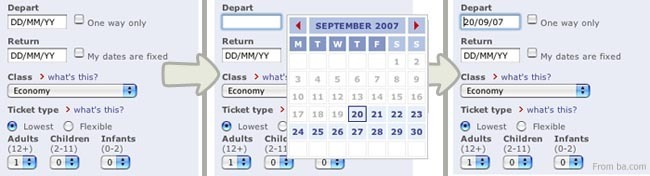
Usage
- Use when the more explicit form elements like select boxes, radio buttons, and checkboxes make entering data for everyday tasks a too complicated process
- Use when the time it takes to complete a task proportional exceeds the importance of the goal the user wants to accomplish.
- Use when the input you want to collect is a specific data type. For instance a zip code, a date or time, a phone number.
- Use when the expected user input follows a specific format which can readily be interpreted by a computer program.
- Do not use for inputs that can possibly be interpreted in many ways. For this purpose, see the Forgiving Format pattern.

This card is part of the UI Patterns printed card deck
A collection of 60 User Interface design patterns, presented in a manner easily referenced and used as a brainstorming tool.
Get your deck!More examples
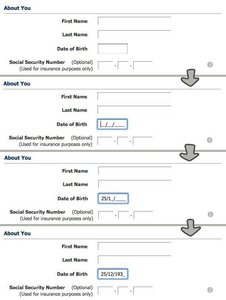
Solution
Represent input fields in a way that clearly guides or limits the user as to what input format to use.
An input field is presented with an accompanying label describing the input that is expected in the field. The label describes a specific structure the user must follow to input a valid value.
In some cases the user is presented with the possibility to use helping mechanisms such as a date selection calendar to fill out the input box in the correct way. When the user has done this multiple times, they slowly learn how the input is formatted, so that they can copy the same format on their own.
Rationale
Set clear expectations by ordering input fields in a Structured Format: clue users as to what kind of input is being requested. By chunking large input fields into smaller bits, data entry errors can be decreased dramatically. It is easier to transcribe or memorize a long number when it is broken up into chunks. Where the Structured Format is well suited for predictable input, the Forgiving Format is well suited for open-ended input.
Using a structured format in an input field saves time for the user, when they are required to fill out the same input field repeatedly as a part of a frequent task. The structured data pattern aids the user through streamlined and controlled inputs, which in turn speeds up data capturing tasks and reduces the garbage in, garbage out problem.
More examples of the Structured Format pattern See all 2 example screenshots
User Interface Design Patterns
- Forms
- Explaining the process
- Community driven
- Tabs
- Jumping in hierarchy
- Menus
- Content
- Gestures
- Tables
- Formatting data
- Images
- Search
- Reputation
- Social interactions
- Shopping
- Increasing frequency
- Guidance
- Registration
Persuasive Design Patterns
- Loss Aversion
- Other cognitive biases
- Scarcity
- Gameplay design
- Fundamentals of rewards
- Gameplay rewards