Table Filter
Design Pattern
Problem summary
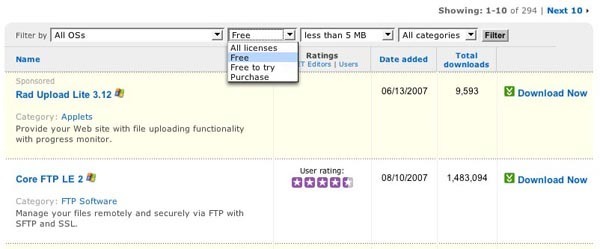
The user needs to categorical filter the data displayed in tables by the columns.
Example
Usage
- Use when you have a very large data set of results that is too large to show in one page
- Use when one or more table columns can easily be summarized into categories to filter by.
More examples
Solution
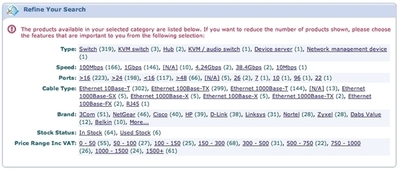
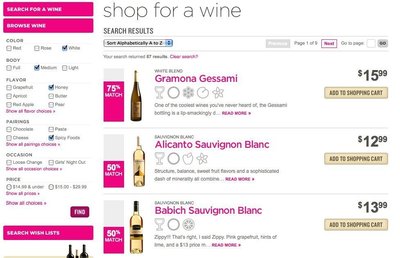
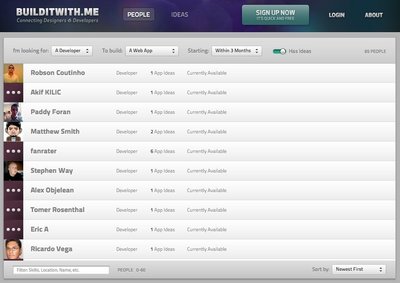
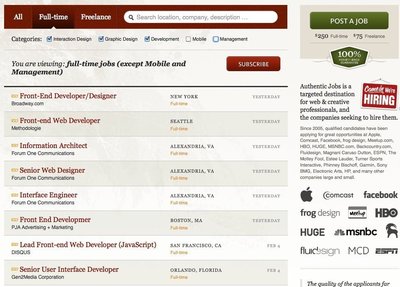
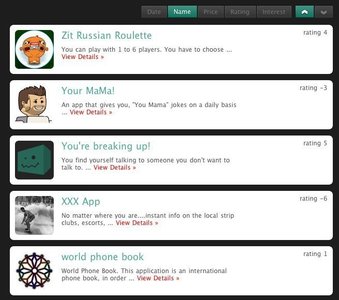
Provide dropdown inputs that present the categories by which the user can filter the data set by. Once the user selects a category and clicks “Filter” or something similar (when the user submits the form), only the row that belong to the selected category are displayed.
Optionally, multiple filters can be added. If this solution is chosen, you must be aware to update the categories of each dropdown box accordingly when one category is selected – as the selecting values in one category might reduce the options left in another.
Rationale
Adding filters to your tables lets the user reduce the amount of items shown. Filters help narrow down search results, letting the user find more accurate results.
More examples of the Table Filter pattern See all 6 example screenshots
User Interface Design Patterns
- Forms
- Explaining the process
- Community driven
- Tabs
- Jumping in hierarchy
- Menus
- Content
- Gestures
- Tables
- Formatting data
- Images
- Search
- Reputation
- Social interactions
- Shopping
- Increasing frequency
- Guidance
- Registration
Persuasive Design Patterns
- Loss Aversion
- Other cognitive biases
- Scarcity
- Gameplay design
- Fundamentals of rewards
- Gameplay rewards
7 comments
Pravin Joshi on May 07, 2008
Very helpful… Good Job. You can add more table filter pattern examples from extjs.com
Stephen Lacy on Dec 08, 2008
Good but not complete, not all filters are single select multiple choice.
Have a look at boo.com for an example of a complex filtering system that really works.
Luke on Feb 09, 2009
I want to thank you for writing this, and also thank Pravin for posting the link to extjs.com. There are some great UI design resources out there if one knows where to look and shares the wealth…
GN on Apr 28, 2009
There is another website and its a great repository called patterntap.com
korbsan on Jun 19, 2009
don’t forget to add an invisible HTML-label for each select-dropdown to guarantee web-accessibility.
Josh Johnson on Aug 27, 2009
This is a nice start on a pattern, but it should also be called out that it’s not especially scalable in either the column or data directions. If I have columns with widely varying values, you’d have to instantiate every possible value in the drop-down, or hope that you can define intelligent ranges. Alternatively, if your table has a large number of columns, then matching the column to the filter becomes unwieldy. I’ve seen two variations that address each of these.
The first is to apply a single filter by means of a drop-down that lists all the column titles followed by an input. This lets the user specify the values in the context of whatever column they choose. But this comes at the expense of only providing one filter across the table.
For the second issue of large numbers of columns, I’ve seen designs that introduce a dedicated row (above or below the header) to contain column specific drop-downs, and each drop-down has an artificial “All” value as a default. This design negates the Filter button, as the filter is executed immediately on changes.
I’d like to see all the patterns do a better job of calling out their pros and cons, since we all know there’s no such thing a one-size-fits-all pattern for design. If there was, we’d all be out of jobs. :)
tobypsl on Jun 04, 2010
Does anyone know how to set up aliases in the drop down list filters ? As pointed out in one of the posts above sometimes there are columns with widely varying values and rather than instatiate every value (as some solutions do) it would help to set up an alias in the drop down that corresponded to a range of values ?
cheers
Comments have been closed